

Gather Information
In the seven or so years that I’ve been an executive assistant, I have learned a whole lot about making travel arrangements for executives. The first rule of arranging travel for execs is that every traveler is different – everyone has unique preferences when it comes to which airlines they like; whether they prefer an aisle, middle, or window seat on the plane; where they want to lay their head at night; and how much hand-holding they need to get from the airport to the hotel to the first meeting location to the conference venue to a snazzy dinner spot to the fundraiser back to the hotel and so on. I’ve worked with execs who are technologically challenged and need their entire step-by-step itinerary printed on paper, and I’ve worked with tech savvy app lovers who just need me to book the flight and hotel and they are off and running.
I recommend sitting down with your exec and documenting their personal info (legal name, age, date of birth, emergency contacts, passport info, etc.), travel preferences, and details about frequent flyer and hotel memberships. I suggest creating a travel planning task list for yourself along with a traveler profile listing all of the details you’ve gathered, and keep all of that information in a file. Google drive is an excellent place to keep all of your exec’s travel info. I created a very simple traveler profile form in Google docs. Do make sure to keep any credit card or other personal information private.
One of my favorite travel planning apps is TripIt which has a web version as well as a smartphone app. There is a free version that works great for basic travel needs. Or you can get TripIt for Teams which allows you to create profiles for each of your travelers. TripIt for Teams runs about $29 a month. One of the cool thing about TripIt is you can email your flight and hotel itineraries to the app and it will automatically add that info to the itinerary. You can also create a map and directions between the various locations your exec will be visiting. If your exec is tech savvy they can utilize the app on their iPhone, Android, BlackBerry, or Windows phone. If they are a little more old school, there is a print option that allows you to choose the level of detail to print.
If your exec travels for speaking engagements it is helpful to connect with the event coordinator to find out who is responsible for paying travel costs and per diem (or speaker fee) and where to send the invoice. Ask about their tech setup. If there is a presentation to project does it need to be saved to a thumb drive? Will there be WiFi? What will the audio/visual setup be like at the venue? Always get as many details as possible. This is important information to add to your exec’s dossier or itinerary.
International Travel
If your exec is traveling internationally make sure to learn about their destination(s) and what documentation and/or inoculations are needed. The Department of State has a useful list of steps to prepare for a safe trip outside the United States. Also, make sure to read up on the U.S. passport changes that are coming soon. You can find more info about obtaining a passport and/or visa via the Department of State website. Also, make sure to note where the U.S. embassies are located in case there is an emergency during your exec’s travels abroad. I also recommend checking the CDC website for health-related travel notices and disease directory.
If you are located in a country other than the U.S. check the appropriate resources for your location.
Flights
Most execs I’ve worked with have a strong preference for one airline over others, what seat and section of the plane they like to sit in, whether they roll in first class or coach, and which airports they prefer. Most execs who travel frequently have frequent flyer memberships with their airlines of choice. I recommend signing them up for the frequent flyer program of any airline they fly – not just their preferred airline(s). And make sure you keep all of this information updated in their traveler profile.
When booking flights, if they have a specific airline they prefer over others, I tend to go to the preferred airline’s app or website first to look at flight options. If I don’t find the perfect flight there I navigate over to my go-to flight planning site – Kayak. I like Kayak because I can do very specific searches based on time frame, date flexibility, and airports within the same vicinity. And of course there is a Kayak app, too. You can also use Kayak to book hotels, rental cars, and vacation/trip packages, and it has a trip planner that is much like TripIt. So, if you like doing all of your travel planning via one app/website then Kayak’s trip planner is an excellent option. It’s really all about what feels most comfortable to you – and your exec, of course.
It is a good idea to sign your exec up for flight status alerts via text message or whichever travel app you use. The paid TripIt account provides flight updates as well.
If your exec is a frequent flyer I highly recommend helping them sign up for a TSA PreCheck membership. It costs $85 for a five-year membership and will allow your exec to speed through security without removing shoes, laptops, liquids, belts, and/or light jackets.
This is great article to read and share with your exec: 16 Ways to Get Through the Airport Faster
Hotels
Booking the right hotel for your exec is an art form. I look at a combination of things: location, cost, amenities, and review scores. It is important to make sure that the hotel you book has the amenities your exec needs and desires. For instance, do they need WiFi? A gym? A swimming pool? Meeting rooms? Free parking? Close to public transportation? Close to a particular venue? Do they prefer to be on the first floor? Do they need an accessible room? These preferences should be listed on your exec’s traveler profile.
As I mentioned above, it is possible to book hotel rooms on Kayak, but I actually prefer to use my Booking.com business account. I like that I can add profiles or “contacts” for each of my execs, which makes booking faster with pre-filled details and allows for travel reporting per contact. I can review past bookings and indicate which hotels are company favorites which makes re-booking my exec’s fave hotels quick and easy. This is especially useful if your exec often travels to the same places. You can also add notes about each hotel booking. For instance, if my exec says that they like a particular hotel, but they never want to be on the pool side of the property again, I can make a note of that for future reservations. Also, Booking.com has reviews and ratings for the hotels listed on the site. My favorite part of Booking.com is that I can enter the address where my exec’s meeting or conference is being held and search for hotels near the venue using the map view.

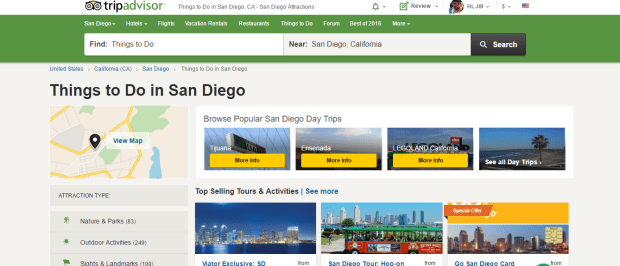
TripAdvisor also has hotel reviews and tons of information about restaurants and things to do organized by location.
Ground Transportation
For execs that need help with directions when they travel, I like to create a Google map that includes all of the destinations for a particular trip. With Google My Maps you can create step-by-step walking, driving, and public transportation directions, and you can share, collaborate, and organize all of the maps alongside other documents in Google Drive – that way both you and your exec have access to the same documents and maps and can use them on-the-go with the app.
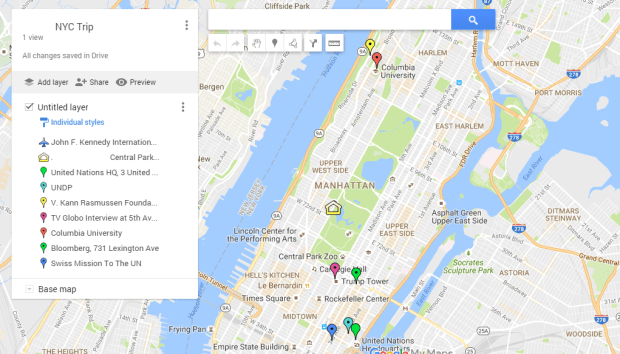
Made with Google My Maps
Renting a car is easy through Kayak, or you can usually access your exec’s preferred rental car company via web and app. Nowadays most execs are hip to easy ride apps like Uber and Lyft, so I don’t need to do as much research on ground transportation as in the past. However, if you know that your exec is traveling to a location that does not have these services make sure to get on the Google and find out what cab companies are available in that area, and put that information in the dossier. Yelp is a very useful tool for determining which cab companies are most reliable and reasonably priced.
Also, look into what public transportation options are available. As I mentioned above, Google maps usually has pub trans info. And most mass transit agencies have online schedules available. Also, the TripIt app often has public transportation information in real time.
Food
I like to use Yelp to locate, read reviews, and make reservations at restaurants in the area where my exec is traveling. You can also make restaurant reservations via OpenTable.
Working with Travel Agents
I’ve worked with travel agents in the past, but honestly I prefer to handle my exec’s travel arrangements myself. This is partially because it saves the organization money, and it saves me time, because I don’t have to be the middle person between the travel agent and my exec, but also because I might be a little bit of a control freak. However, I will say that if you are booking travel for a large group or you work for a large company it may be better to work with a travel agent.
When Your Exec Returns
Part of your travel planning task list should include a list of what needs to be done when your exec returns from their trip. If you handle their expense reports make sure to get any travel receipts. Check if there are new business contacts to input into your exec’s contacts or the company’s CRM. Ask for feedback about the flight, hotel, or any aspect of the trip that your exec particularly liked or would like you to do differently in the future. I continue to update and refine my exec’s traveler profile so I can make sure that they have the best trip possible every time.
Below are a few other articles on travel planning for your exec that I have found useful.
Creating A Travel Itinerary For Your Boss: http://csuiteassistants.net/powerpieces/creating-a-travel-itinerary-for-your-boss
How to Plan Business Travel & Business Travel Planning Checklists: https://officedynamics.com/how-to-plan-business-travel-business-travel-planning-checklists/
Travel Itineraries: Effectively Organizing Executive Travel: http://allthingsadmin.com/administrative-professionals/travel-itineraries-effectively-organizing-executive-travel/
Making Travel Arrangements for Executives: http://pa-prive.com/making-travel-arrangements-for-executives/
I’d love to hear other Admin Unicorn’s tips and tricks for handling their exec’s travel. Feel free to leave a comment with any suggestions or questions.
#AdminUnicorn #AdminLoveForLife #OfficeMagic #Travel

 The Admin Unicorn